
Refersion Tracking Documentation
Complexity — Beginner Developer
Getting Started
In order for Refersion to operate as expected, we must be able to capture your transactions. If you are not using a shopping cart platform that we already integrate with, you must implement our tracking solution on your web site manually. Our tracking isn’t very complicated and is installed similar to how Google Analytics is installed.
To install, you must complete the following steps.
- Include a JavaScript code on every page on your site so that we can track your affiliate visits.
- Report each order to us either on your “thank you” page or through a Webhook (for more advanced developers).
Your Refersion API Keys
For most of our APIs you must identify your account with your own unique Refersion API Public and/or Secret key. You may see existing or create new API keys right from your account settings.
Step 1 – Tracking Visits
Please copy/paste the following code on every page on your web site where you expect your affiliates to drive traffic. Make sure to place the code just before the </body> tag in your HTML.
Code
<!-- REFERSION TRACKING: BEGIN -->
<script src="//www.refersion.com/tracker/v3/pub_0123456789DEMO.js"></script>
<script>_refersion();</script>
<!-- REFERSION TRACKING: END -->
Step 2 – Tracking Orders
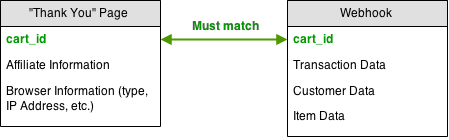
In order for us to calculate any commissions owed, each order must be reported to us. You may do so in one of two ways:
Variable Descriptions
Transaction Data
A transaction represents the entire order that occurred, and contains the following values:
| Value | Type | Required | Description |
|---|---|---|---|
| cart_id | String | Yes – Webhook only | Cart ID that matches what you’re reported in _addCart, as per above. This field is only required when reportinng transactions via a Webhook (option 2). |
| order_id | String | Yes | Unique shopping cart order ID or transaction number used to reference the purchase that you’re reporting. |
| subscription_id | String | Yes – Subscription Only | For subscription purchases only: A unique identifier that represents the whole subscription, which can be a reference to all of the individual order_ids within this subscription. Only available in webhook reporting. |
| is_subscription | Boolean | Yes – Subscription Only | If you are reporting an event which belongs to a subscription, set this to TRUE, otherwise leave blank.Only available in webhook reporting. |
| shipping | Number | No | Total shipping and handling the customer was charged for the order. |
| tax | Number | No | Total tax the customer was charged for the order. |
| discount | Number | No | Total in discounts that were applied to the order. |
| discount_code | String | No | The discount or coupon code that was used on the order. |
| currency_code | String | Yes | The three letter currency code of the order totals that you are reporting. Example: USD, CAD, GBP. |
Customer Data
A customer represents the individual customer who purchased, and contains the following values:
| Value | Type | Required | Description |
|---|---|---|---|
| first_name | String | No | Customer’s first name. |
| last_name | String | No | Customer’s last name. |
| String | No | Customer’s email address. | |
| ip_address | String | No | The IP address of the customer. |
Item Data
An item represents an individual product that the customer had ordered, and contains the following values:
| Value | Type | Required | Description |
|---|---|---|---|
| sku | String | Yes | A unique Product SKU or identifier ID. Can be blank, but we highly recommend that you populate the field. |
| name | String | No | The name of the item. |
| quantity | Number | Yes | Total quantity ordered of the product. |
| price | Number | Yes | Price of each item. For example, if the customer ordered 10 items at $5 each, you should report $5, not $50. Do not include currency symbols. |
